Data Collection API
CARLA-based multi-modal sensor data pipeline for the LANCER project carla 0.9.14+ Python 3.8+
The carla-data-api module automates the collection of
synchronized sensor data from a simulated urban environment. A
Dodge Charger 2020 ego vehicle (EV) drives a fixed route while
RGB, depth, semantic segmentation, and LiDAR sensors capture the
scene simultaneously from three horizontal angles. The process is
repeated automatically for every weather preset in
WEATHER_PRESETS.csv, producing a structured dataset
suitable for training perception and navigation models.
The pipeline iterates over all defined weather conditions, resetting the world between each run so that traffic and lighting conditions change consistently across the dataset.
Output Format
Each captured frame is saved as a single 960 × 960 px PNG containing a 4-row × 3-column sensor grid. Rows correspond to sensor modalities; columns correspond to the three horizontal viewing angles (left −120°, forward 0°, right +120°). Each cell is 240 × 320 px.
Grid Layout
The LiDAR row is produced by projecting the single roof-mounted point cloud onto each of the three camera planes using a pinhole camera model. Point brightness encodes distance logarithmically: bright pixels are close, dark pixels are far.
Frames are written to:
dataset/
└── <weather_preset_name>/
    ├── frame_0.png
    ├── frame_1.png
    └── ...
Sample Frames
The following samples were captured in clearday and
clearnight conditions from the
sample_dataset/ directory.
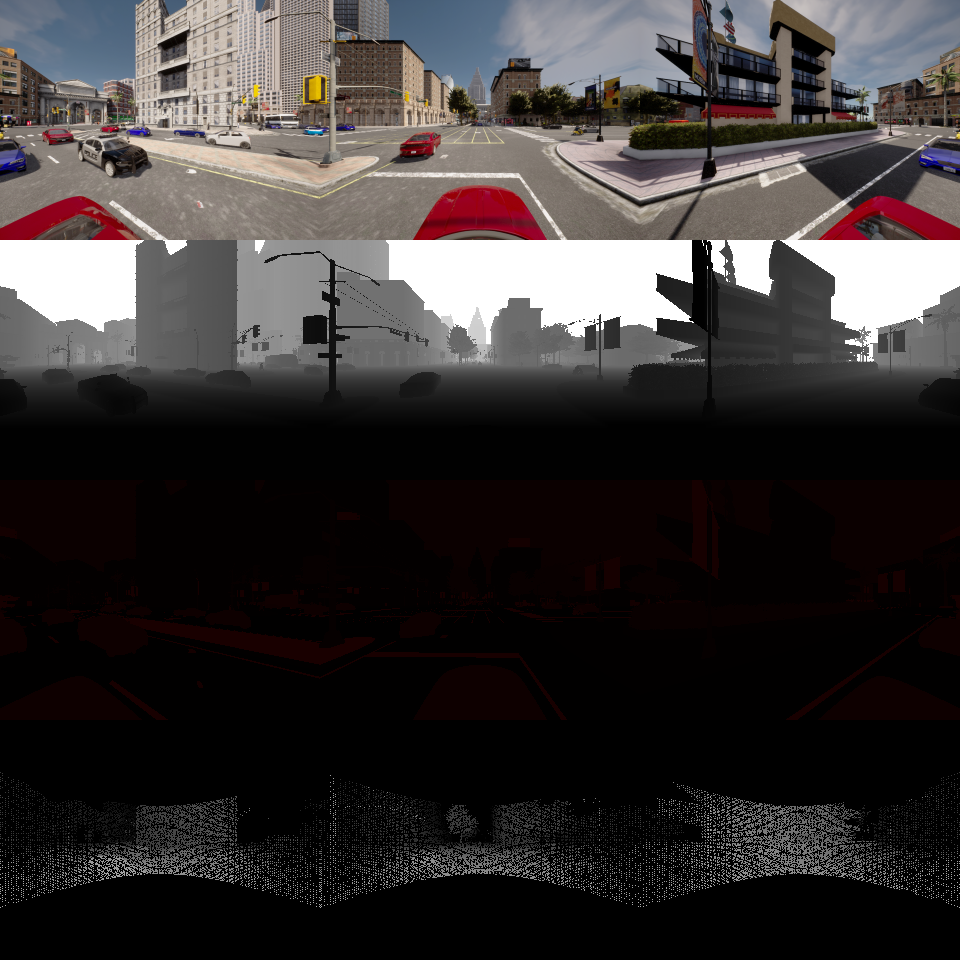
Clear Day · frame_0
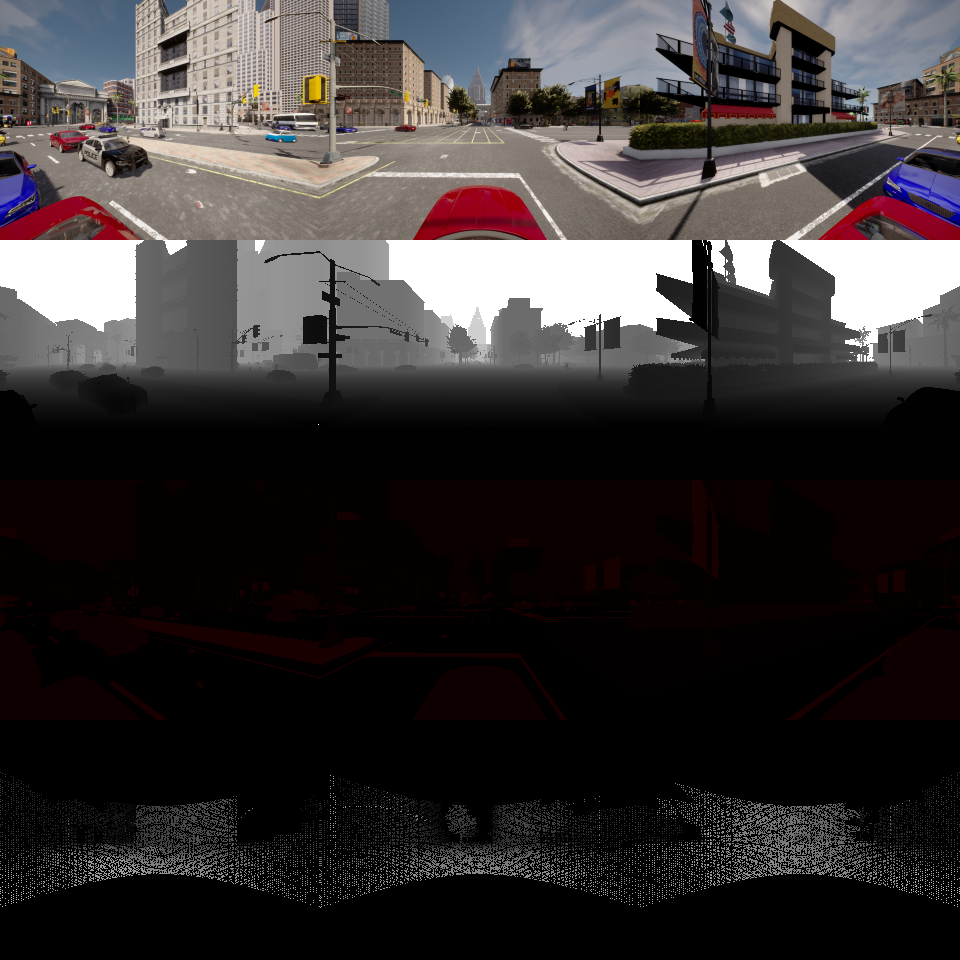
Clear Day · frame_1
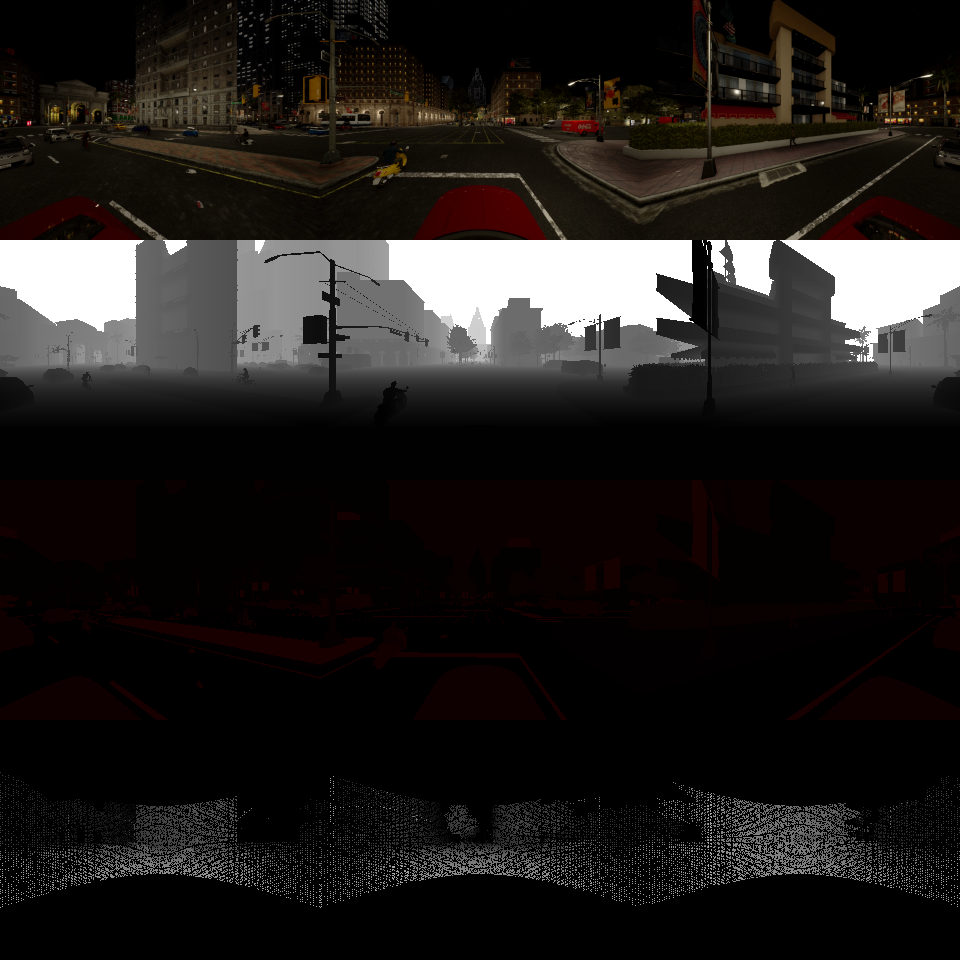
Clear Night · frame_0
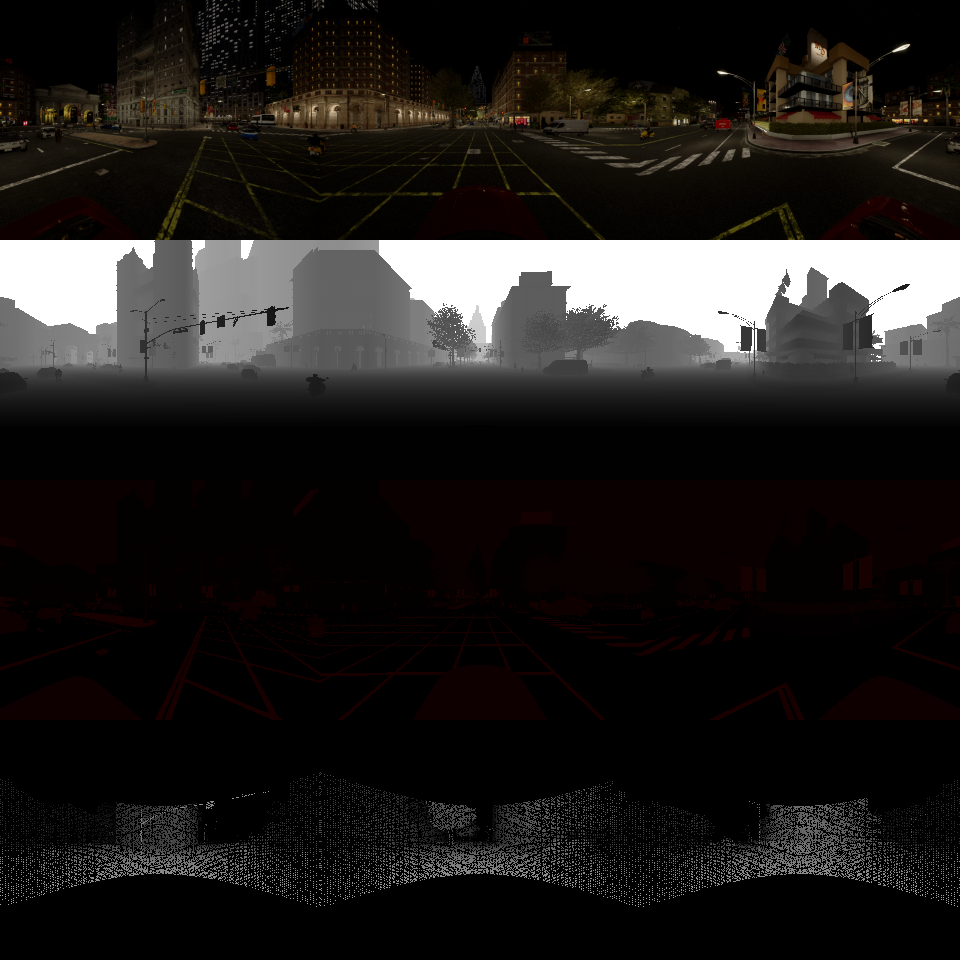
Clear Night · frame_1
Requirements
| Dependency | Version | Notes |
|---|---|---|
CARLA Simulator | 0.9.14+ | Server must be running before the script is invoked |
Python | 3.8+ | |
carla (Python API) | Matches server version | Install from your CARLA distribution; see CARLA docs |
numpy | any | |
opencv-python | any | Imported as cv2 |
scikit-image | any | Imported as skimage |
Install the Python dependencies with:
pip install numpy opencv-python scikit-imageNote
The carla Python package is not on PyPI.
It must be installed from your local CARLA installation directory.
Refer to the
CARLA Quick Start guide
for instructions.
Usage
Quick Start
-
Start the CARLA server
Launch the CARLA simulator. The server must be listening on
localhost:2000(the default port) before running the script.# Linux ./CarlaUE4.sh # Windows CarlaUE4.exe -
Navigate to the API directory
cd carla-data-api -
Run the collection script
python collect_data.pyThis executes
generate_dataset(max_images_per_weather=2, interval=20), collecting 2 frames per weather preset with 20 simulation ticks (~2 s) between captures, across the first 6 weather presets inWEATHER_PRESETS.csv. Output is written todataset/.
Custom Collection Parameters
Call generate_dataset with different arguments to control
the volume and timing of captured data:
from collect_data import generate_dataset

generate_dataset(
    max_images_per_weather=10,   # frames to capture per weather condition
    interval=10                  # simulation ticks between captures (~1 s each)
)| Parameter | Default | Description |
|---|---|---|
max_images_per_weather | 2 | Maximum frames saved per weather preset. Collection may stop earlier if the EV reaches the end of the route. |
interval | 20 | Number of simulation ticks between consecutive captures. At 10 Hz this equals interval × 0.1 s. |
Single-Weather Run
For finer control, call run_simulation directly to collect
data for one weather condition without cycling through the full preset list:
import carla
from collect_data import Simulation, run_simulation

client = carla.Client('localhost', 2000)
client.set_timeout(30.0)
sim = Simulation(client)

run_simulation(
    sim=sim,
    weather={
        'sun_altitude_angle': 60.0,
        'cloudiness': 20.0,
        # ... other WeatherParameters fields
    },
    max_images=5,
    interval=15,
    save_path_prefix='my_dataset/clearday/frame'
)
Configuration
Weather Presets (WEATHER_PRESETS.csv)
Each row defines a named weather condition. The name
column is used as the output subdirectory name. All other columns
map directly to
carla.WeatherParameters
attributes.
| Column | Range | Description |
|---|---|---|
name | — | Preset identifier; used as the output directory name (e.g. clearday, heavyfog) |
cloudiness | 0 – 100 | Sky cloud coverage |
fog_density | 0 – 100 | Fog thickness |
fog_distance | metres | Distance at which fog starts |
fog_falloff | — | Fog density decay with altitude |
wetness | 0 – 100 | Road surface wetness |
precipitation_deposits | 0 – 100 | Standing water / puddles on the road |
precipitation | 0 – 100 | Rainfall intensity |
wind_intensity | 0 – 100 | Wind speed |
sun_altitude_angle | −90° – 90° | Sun elevation; negative values place the sun below the horizon (night) |
sun_azimuth_angle | 0° – 360° | Sun compass direction |
dust_storm | 0 – 100 | Dust / sand storm intensity |
scattering_intensity | — | Combined Mie + Rayleigh scattering |
rayleigh_scattering_scale | — | Blue-sky scattering coefficient |
mie_scattering_scale | — | Haze / fog scattering coefficient |
Vehicle Probabilities (VEHICLE_PROBABILITIES.csv)
Controls the NPC traffic composition. The global category mix is fixed in the code; the CSV controls how individual models are distributed within each category.
| Column | Description |
|---|---|
blueprint_id | CARLA blueprint identifier, e.g. vehicle.nissan.micra |
category | 2W (two-wheelers), 4WP (passenger), 4WU (utility), 4WS (sports) |
category_probability | Fractional share of this model within its category (values per category must sum to ≤ 1) |
Global category spawn mix (defined in Simulation.__init__):
| Category | Share |
|---|---|
Two-wheelers (2W) | 30 % |
Passenger cars (4WP) | 50 % |
Utility vehicles (4WU) | 12 % |
Sports cars (4WS) | 8 % |
EV Route
The ego vehicle follows a fixed sequence of map spawn-point indices
defined in Simulation.get_spawn_points_and_drive_indices().
To change the route, edit the drive_indices list in that
method. Collection stops early for a given weather run if the EV comes
within 5 m of the penultimate route waypoint.
Sensor Setup
All sensors are mounted on the EV roof at a height of
2 × bounding_box.extent.z + 1 m. The LiDAR sensor
faces forward; the three camera sets share the same mount point
but are rotated to their respective yaw angles.
| Sensor | Blueprint | Resolution / Config | Notes |
|---|---|---|---|
| LiDAR | sensor.lidar.ray_cast |
64 channels, 500 k pts/s, 100 m range, ±20° vertical FoV | Single sensor; projected onto all three camera planes in post-processing |
| RGB camera (×3) | sensor.camera.rgb |
1280 × 960 (4× oversample), 120° FoV; downsampled to 320 × 240 | Post-processing enabled (lens flare, motion blur, chromatic aberration) |
| Depth camera (×3) | sensor.camera.depth |
320 × 240, 120° FoV | Log-depth encoding applied via CARLA colour converter |
| Semantic segmentation (×3) | sensor.camera.semantic_segmentation |
320 × 240, 120° FoV | Class label stored in the red channel; CityScapes colour palette |
Collection Pipeline
The script runs in synchronous mode at a fixed 10 Hz (0.1 s/tick). The Traffic Manager is bound to port 8000.
- WeatherIterator loads all presets from
WEATHER_PRESETS.csvand yields them one by one. - For each preset,
run_simulationreloads the CARLA world, applies the weather parameters, and spawns NPC traffic (up to 200 pedestrians and a configurable number of vehicles sampled fromVEHICLE_PROBABILITIES.csv). - The ego vehicle is spawned, teleported to the route start, and handed to the Traffic Manager autopilot with lane-changing disabled.
- Sensors are attached and their callbacks push raw data into a thread-safe
Queue. collect_dataticks the simulation, drains the queue after each tick, and assembles the 4-row × 3-column composite image everyintervalticks.- Frames are saved to
dataset/<preset_name>/frame_N.pnguntilmax_images_per_weatheris reached or the EV nears the end of the route. - All sensors and NPC actors are destroyed before the next weather preset begins.
Notes
Synchronous mode
The script drives the simulation clock manually. Do not
run other clients that call world.tick() simultaneously,
as this will desynchronize the sensor queue.
Traffic Manager port
The Traffic Manager is bound to port 8000. Make sure
this port is free before starting the script. If another CARLA client
is already using port 8000, change the port in
Simulation.__init__ and in
EV.initialize_autopilot.
Pedestrian re-routing
Walkers that reach their destination are automatically assigned a new random destination. Walkers that die mid-run are destroyed and replaced so that pedestrian density stays approximately constant.